
Seamlessly syncing data across cloud storage is essential for productivity and efficiency in today’s networked digital world. Whether you manage your organization’s data across AWS and SharePoint or move your personal files between Dropbox and Google Drive, knowing how to perform cloud sync will keep your data secure, up-to-date, and always accessible. This post will give you the best practice with essential steps to help you easily perform cloud-to-cloud sync via MultCloud and get the most out of the cloud without manual data transfers.
Why perform cloud sync?
Cloud sync improves efficiency and collaboration by ensuring that data is always up-to-date and available across multiple platforms. Automated data transfer eliminates the need for manual uploads, reducing errors and saving time.
Powerful data redundancy is another advantage of cloud sync, which prevents data loss by storing copies of data in multiple locations. The cloud provides flexibility by allowing easy access to files from anywhere with an Internet connection, whether for personal or professional use. It also enables real-time collaboration. Groups can work together no matter where they are.
MultCloud – Professional cloud file sync service
MultCloud is recommended to you as a professional and free cloud to cloud sync service. It supports more than 30 cloud storage services. You can add your cloud accounts to MultCloud and then sync files between them by Cloud Sync.
☁️ Supported cloud storage services
Google Drive, Google Workspace, OneDrive, OneDrive for Business, SharePoint, Dropbox, Dropbox Business, MEGA, Google Photos, iCloud Photos, FTP, Box, Box for Business, pCloud, Baidu, Flickr, HiDrive, Yandex, NAS, WebDAV, MediaFire, iCloud Drive, WEB.DE, Evernote, Amazon S3, Wasabi, ownCloud, MySQL, Egnyte, put.io, ADrive, SugarSync, Backblaze, CloudMe, MyDrive, Cubby, Icedrive, iDrive, and 4Shared.
⭐ Cloud Sync: A function specially designed for cloud file sync, including 8 distinctive sync modes.
- Two-way Sync: The sync process can run both ways back and forth.
- Real Time Sync: The sync process will run in real time without pausing unless there is nothing changed for 7 days.
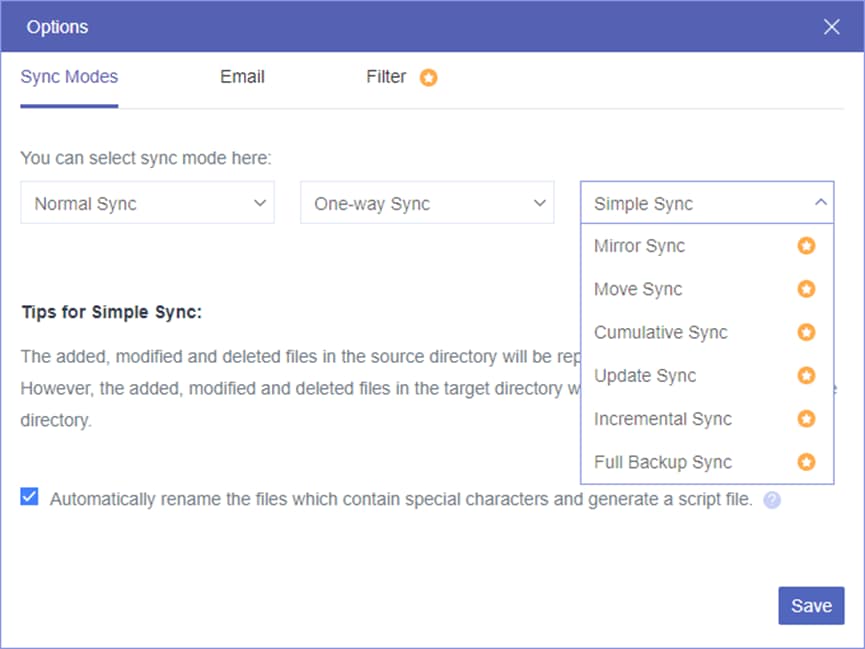
- Mirror Sync: It ensures files are the same on both the source and target clouds.
- Move Sync: It will delete the synced files in the source cloud after the syncing is finished.
- Incremental Sync: Only the newly added or modified files will be synced to the target in this mode.
- Cumulative Sync: If you delete some files in the source cloud, they will not be deleted in the target even after syncing.
- Full Backup Sync: All the files will be synced to the target cloud in every task.
- Update Sync: The latest sync task will cover the previous files in the target cloud and transfer all the files from the source.
If you find MultCloud Cloud Sync can satisfy your needs, you can follow the steps in the next part to create your own task.
How to perform cloud sync via MultCloud
The steps to create a Cloud Sync task are quite easy. Whether you are a tech novice or a seasoned pro, you can master the way with the guide below. Here is an example of using Cloud Sync to sync Google Drive and Dropbox.
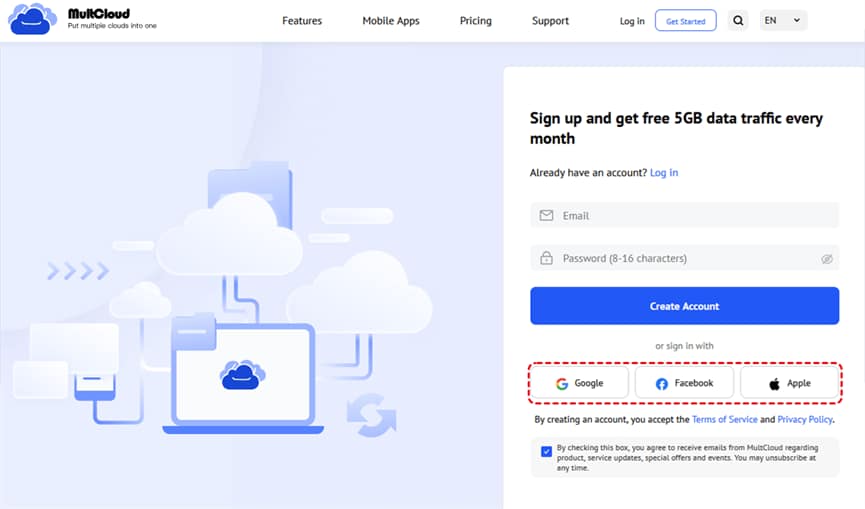
Step 1. Enter the MultCloud website and click “Get started for free” to sign up for an account.
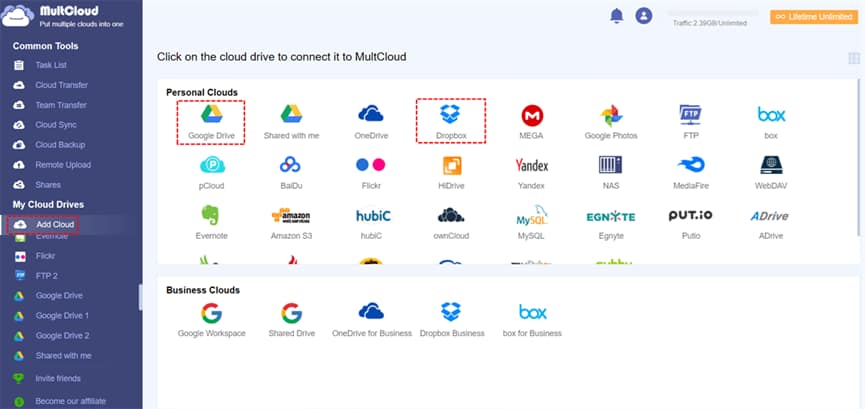
Step 2. Add Google Drive to MultCloud by clicking “Add Cloud” and the Google Drive logo. Also, follow this step to add Dropbox.
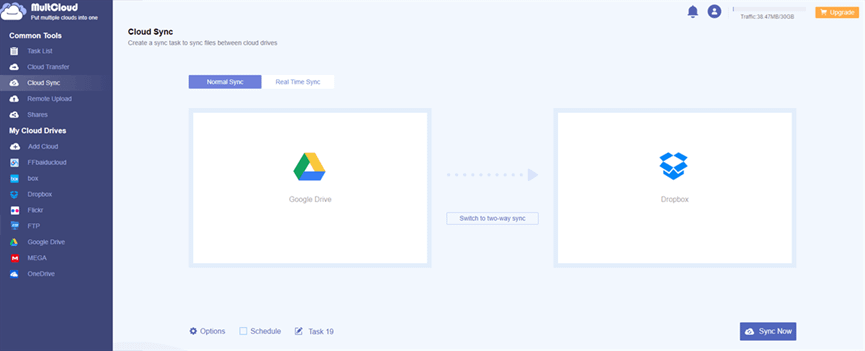
Step 3. Select “Cloud Sync” in the left sidebar. Then, choose Google Drive in the FROM box as the source cloud and Dropbox in the TO box as the target cloud.
Step 4. Open “Options” to choose your preferred sync mode. You can also schedule the task and select files with file extensions. After saving the settings, click “Sync Now” to start this sync task.
Conclusion
Cloud Sync can be easily executed by the MultCloud Cloud Sync function. You can customize your task with the sync modes in terms of your needs. Besides, there are more functions on MultCloud that may correspond to your other requirements, such as Cloud Transfer, Cloud Sync, Team Transfer (for business clouds), Email Migration (save emails to the cloud as PDF files), Image Saver (Instagram photo saver to local or cloud), Save Webpage as PDF (save webpages as PDF/PNG files to the cloud), etc.